> ## Documentation Index
> Fetch the complete documentation index at: https://docs.growthbook.io/llms.txt
> Use this file to discover all available pages before exploring further.

# Publishing & Approval Flows

> Draft feature revisions, request review, resolve merge conflicts, and require approval before publishing.

export const CommercialFeature = ({feature, description}) => {
  const commercialFeatures = {
    "adv-presentations": {
      plan: "enterprise",
      displayName: "Adv Presentations"
    },
    "advanced-permissions": {
      plan: "pro",
      displayName: "Advanced Permissions"
    },
    "ai-byok": {
      plan: "enterprise",
      displayName: "Ai Byok"
    },
    "ai-suggestions": {
      plan: "enterprise",
      displayName: "AI Suggestions"
    },
    archetypes: {
      plan: "pro",
      displayName: "Archetypes"
    },
    "audit-logging": {
      plan: "enterprise",
      displayName: "Audit Logging"
    },
    "cloud-proxy": {
      plan: "pro",
      displayName: "Cloud Proxy"
    },
    "code-references": {
      plan: "pro",
      displayName: "Code References"
    },
    "contextual-bandits": {
      plan: "enterprise",
      displayName: "Contextual Bandits"
    },
    "custom-hooks": {
      plan: "enterprise",
      displayName: "Custom Hooks"
    },
    "custom-launch-checklist": {
      plan: "enterprise",
      displayName: "Custom Launch Checklist"
    },
    "custom-markdown": {
      plan: "enterprise",
      displayName: "Custom Markdown"
    },
    "custom-metadata": {
      plan: "enterprise",
      displayName: "Custom Metadata"
    },
    "custom-roles": {
      plan: "enterprise",
      displayName: "Custom Roles"
    },
    dashboards: {
      plan: "enterprise",
      displayName: "Dashboards"
    },
    "decision-framework": {
      plan: "pro",
      displayName: "Decision Framework"
    },
    "encrypt-features-endpoint": {
      plan: "pro",
      displayName: "Encrypt Features Endpoint"
    },
    "environment-inheritance": {
      plan: "enterprise",
      displayName: "Environment Inheritance"
    },
    "events-forwarder": {
      plan: "pro",
      displayName: "Events Forwarder"
    },
    "experiment-impact": {
      plan: "enterprise",
      displayName: "Experiment Impact"
    },
    "feature-configs": {
      plan: "enterprise",
      displayName: "Feature Configs"
    },
    "funnel-metrics": {
      plan: "pro",
      displayName: "Funnel Metrics"
    },
    "hash-secure-attributes": {
      plan: "pro",
      displayName: "Hash Secure Attributes"
    },
    "historical-power": {
      plan: "pro",
      displayName: "Historical Power"
    },
    holdouts: {
      plan: "enterprise",
      displayName: "Holdouts"
    },
    "incremental-refresh": {
      plan: "enterprise",
      displayName: "Incremental Refresh"
    },
    "json-validation": {
      plan: "enterprise",
      displayName: "JSON Validation"
    },
    "large-saved-groups": {
      plan: "enterprise",
      displayName: "Large Saved Groups"
    },
    learnings: {
      plan: "enterprise",
      displayName: "Learnings"
    },
    livechat: {
      plan: "pro",
      displayName: "Livechat"
    },
    "manage-official-resources": {
      plan: "enterprise",
      displayName: "Manage Official Resources"
    },
    "metric-correlations": {
      plan: "enterprise",
      displayName: "Metric Correlations"
    },
    "metric-effects": {
      plan: "enterprise",
      displayName: "Metric Effects"
    },
    "metric-groups": {
      plan: "enterprise",
      displayName: "Metric Groups"
    },
    "metric-populations": {
      plan: "pro",
      displayName: "Metric Populations"
    },
    "metric-slices": {
      plan: "enterprise",
      displayName: "Metric Slices"
    },
    "multi-armed-bandits": {
      plan: "pro",
      displayName: "Multi Armed Bandits"
    },
    "multi-metric-queries": {
      plan: "enterprise",
      displayName: "Multi Metric Queries"
    },
    "multi-org": {
      plan: "enterprise",
      displayName: "Multi Org"
    },
    "multiple-sdk-webhooks": {
      plan: "pro",
      displayName: "Multiple Sdk Webhooks"
    },
    "no-access-role": {
      plan: "enterprise",
      displayName: "No Access Role"
    },
    "override-metrics": {
      plan: "pro",
      displayName: "Override Metrics"
    },
    "pipeline-mode": {
      plan: "enterprise",
      displayName: "Pipeline Mode"
    },
    "post-stratification": {
      plan: "enterprise",
      displayName: "Post Stratification"
    },
    "precomputed-dimensions": {
      plan: "pro",
      displayName: "Precomputed Dimensions"
    },
    "prerequisite-targeting": {
      plan: "enterprise",
      displayName: "Prerequisite Targeting"
    },
    prerequisites: {
      plan: "pro",
      displayName: "Prerequisites"
    },
    "product-analytics-dashboards": {
      plan: "pro",
      displayName: "Product Analytics Dashboards"
    },
    "project-admin-role": {
      plan: "enterprise",
      displayName: "Project Admin Role"
    },
    "quantile-metrics": {
      plan: "pro",
      displayName: "Quantile Metrics"
    },
    "ramp-schedules": {
      plan: "pro",
      displayName: "Ramp Schedules"
    },
    redirects: {
      plan: "pro",
      displayName: "Redirects"
    },
    "regression-adjustment": {
      plan: "pro",
      displayName: "CUPED"
    },
    releases: {
      plan: "enterprise",
      displayName: "Releases"
    },
    "remote-evaluation": {
      plan: "pro",
      displayName: "Remote Evaluation"
    },
    "require-approvals": {
      plan: "enterprise",
      displayName: "Require Approvals"
    },
    "require-project-for-features-setting": {
      plan: "enterprise",
      displayName: "Require Project For Features Setting"
    },
    "require-project-for-sdk-connections-setting": {
      plan: "enterprise",
      displayName: "Require Project For Sdk Connections Setting"
    },
    "retention-metrics": {
      plan: "pro",
      displayName: "Retention Metrics"
    },
    "safe-rollout": {
      plan: "pro",
      displayName: "Safe Rollout"
    },
    saveSqlExplorerQueries: {
      plan: "pro",
      displayName: "Save SQL Explorer Queries"
    },
    "schedule-feature-flag": {
      plan: "pro",
      displayName: "Schedule Feature Flag"
    },
    "scheduled-revisions": {
      plan: "enterprise",
      displayName: "Scheduled Revisions"
    },
    scim: {
      plan: "enterprise",
      displayName: "SCIM"
    },
    "sequential-testing": {
      plan: "pro",
      displayName: "Sequential Testing"
    },
    "share-product-analytics-dashboards": {
      plan: "enterprise",
      displayName: "Share Product Analytics Dashboards"
    },
    simulate: {
      plan: "pro",
      displayName: "Simulate"
    },
    sso: {
      plan: "enterprise",
      displayName: "SSO"
    },
    "sticky-bucketing": {
      plan: "pro",
      displayName: "Sticky Bucketing"
    },
    teams: {
      plan: "enterprise",
      displayName: "Teams"
    },
    templates: {
      plan: "enterprise",
      displayName: "Templates"
    },
    "unlimited-managed-warehouse-usage": {
      plan: "pro",
      displayName: "Unlimited Managed Warehouse Usage"
    },
    "visual-editor": {
      plan: "pro",
      displayName: "Visual Editor"
    }
  };
  const {plan, displayName} = commercialFeatures[feature];
  const isEnterprise = plan === "enterprise";
  const defaultDescription = isEnterprise ? "is available on Enterprise plans." : "is available on Pro and Enterprise plans.";
  const planLabel = isEnterprise ? "Enterprise" : "Pro";
  const containerStyle = isEnterprise ? {
    backgroundColor: "color-mix(in srgb, var(--indigo-a3) 60%, transparent)"
  } : {
    backgroundColor: "color-mix(in srgb, var(--amber-a3) 60%, transparent)"
  };
  const badgeStyle = isEnterprise ? {
    boxShadow: "inset 0 0 0 1px var(--indigo-a8)",
    color: "var(--indigo-a11)"
  } : {
    boxShadow: "inset 0 0 0 1px var(--amber-a8)",
    color: "var(--amber-a11)"
  };
  return <div className="flex items-start gap-2 mb-4 p-3 text-sm leading-[1.4] rounded-lg" style={containerStyle} role="note">
      <span className="inline-flex items-center justify-center px-1.5 h-5 text-xs font-medium rounded-full shrink-0 leading-none" style={badgeStyle}>
        {planLabel}
      </span>
      <div className="flex-1 leading-[1.3]">
        <strong className="font-semibold">{displayName}</strong>{" "}
        {defaultDescription} {description}
      </div>
    </div>;
};

When you make changes to a feature flag or [saved group](/features/targeting#saved-groups) in GrowthBook, those changes go through a publishing workflow before they reach your users. This page covers the full lifecycle: drafts, publishing, revisions, merge conflicts, and optional approval flows.

The same revision and approval model applies to both feature flags and saved groups. The sections below describe the flow for feature flags first; the [Saved Groups](#saved-groups) section at the end calls out where the saved group experience differs.

## Drafts and Publishing

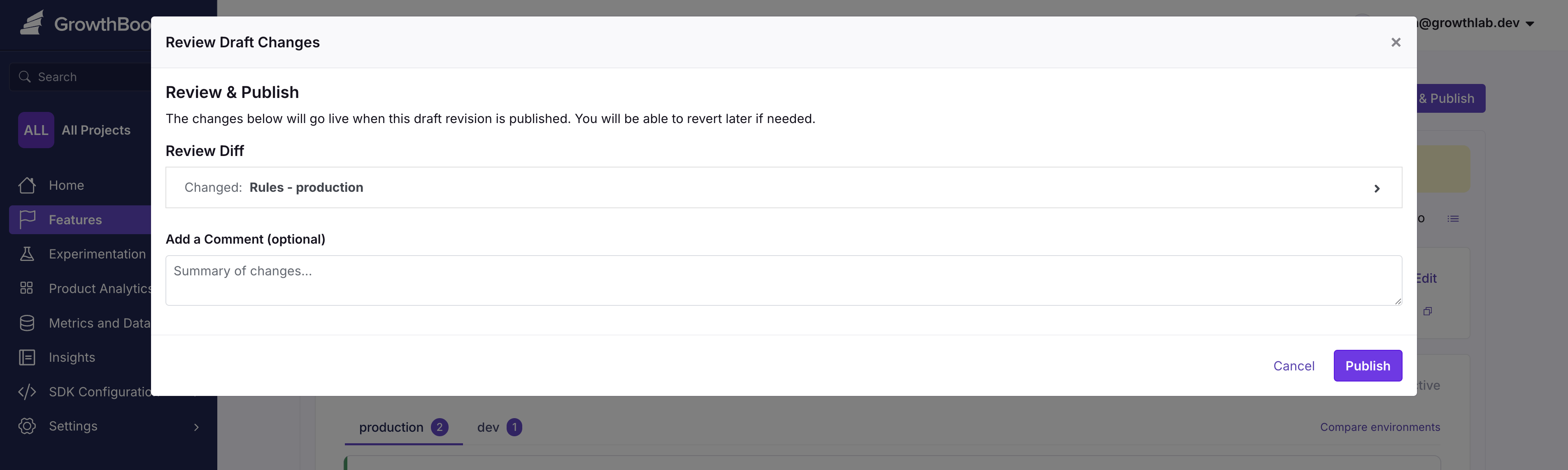
When you change a feature's definition (e.g., the default value or rules), GrowthBook automatically creates a new draft revision. This draft is unpublished and only visible within the GrowthBook UI, not to your users.

Continue adding changes to the draft, and when you're ready, publish them all at once with an optional commit message.

<img src="https://mintcdn.com/growthbook-ea15456d/1rsmujQCDzXz2Vho/static/images/features/feature-publishing-2.png?fit=max&auto=format&n=1rsmujQCDzXz2Vho&q=85&s=966ce1638181856d7ea0365e05f08a69" alt="Draft Modal" width="3810" height="1142" data-path="static/images/features/feature-publishing-2.png" />

## Revisions

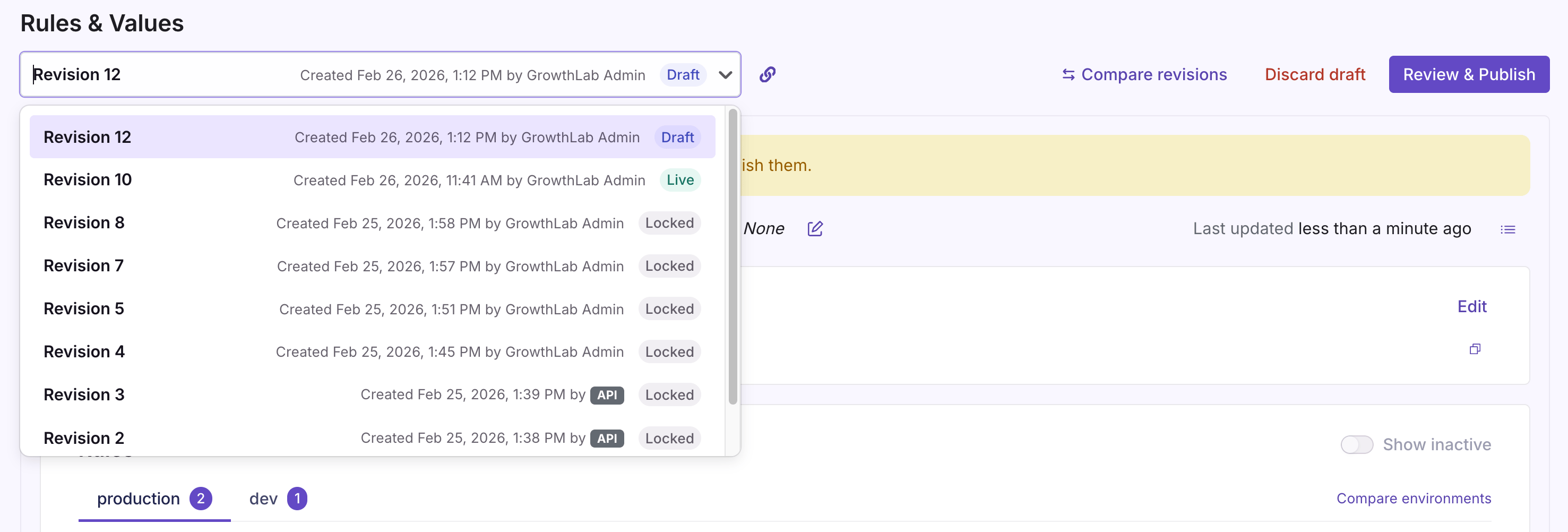
Once published, a revision becomes locked and can no longer be changed.

To undo changes and revert to a previous state, use the **Revision** dropdown to select the version you want to revert to, then click **Revert**. You can review the changes that will be applied before submitting.
<Frame>
  <img src="https://mintcdn.com/growthbook-ea15456d/1rsmujQCDzXz2Vho/static/images/features/revision-dropdown-2.png?fit=max&auto=format&n=1rsmujQCDzXz2Vho&q=85&s=700796bba1014bab2f2602b04a55ce8f" alt="Feature Revisions" width="800" data-path="static/images/features/revision-dropdown-2.png" />
</Frame>

## Merge Conflicts

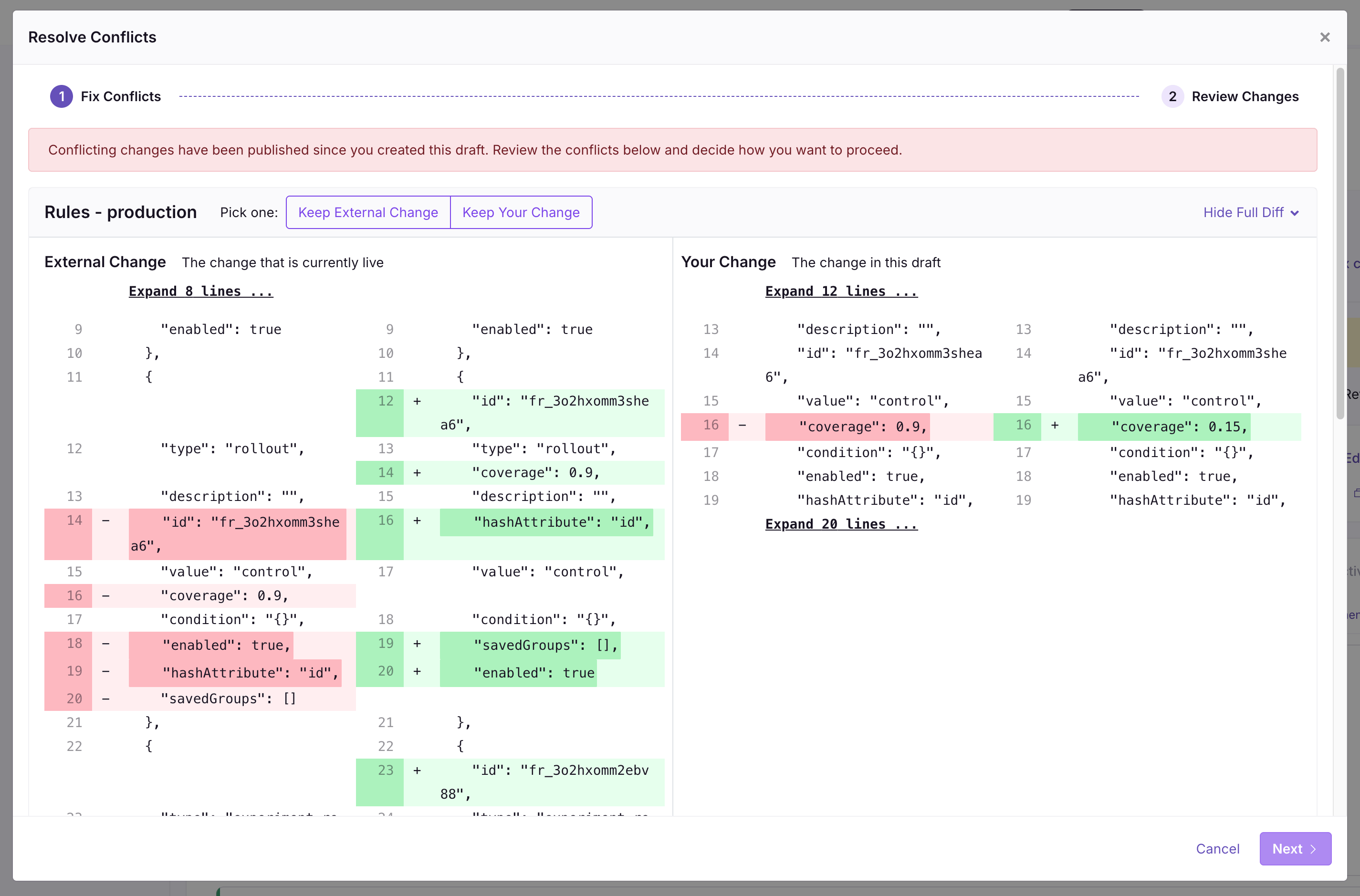
Your draft can diverge from the live version of a feature if someone else publishes changes while you're still editing. GrowthBook can merge some changes automatically (e.g., if you change a rule in "dev" and someone else changes a rule in "production"). For changes that can't be resolved automatically, you must fix the conflicts before publishing your draft.

The conflict resolution process works similarly to version control systems like Git. For each conflict, GrowthBook shows a diff and lets you choose how to proceed.

In the example below, the Default Value was set to `foo` when you first created your draft. In your draft, you changed the value to `bar`. At the same time, someone else published a new version, changing the value to `hi!!`. So, now you have to choose which change you want to keep.
<Frame>
  <img src="https://mintcdn.com/growthbook-ea15456d/1rsmujQCDzXz2Vho/static/images/features/resolve-conflicts-2.png?fit=max&auto=format&n=1rsmujQCDzXz2Vho&q=85&s=400b5f1c6dcde585d2dd03362a8c7f4d" alt="Resolve Conflicts" width="800" data-path="static/images/features/resolve-conflicts-2.png" />
</Frame>

## Approval Flows

<CommercialFeature feature="require-approvals" />

With Approval flows, you can require approval before publishing any change to an existing feature flag. Approval flows help reduce errors by making sure changes to features have been viewed and approved by someone else in your organization.

### Settings

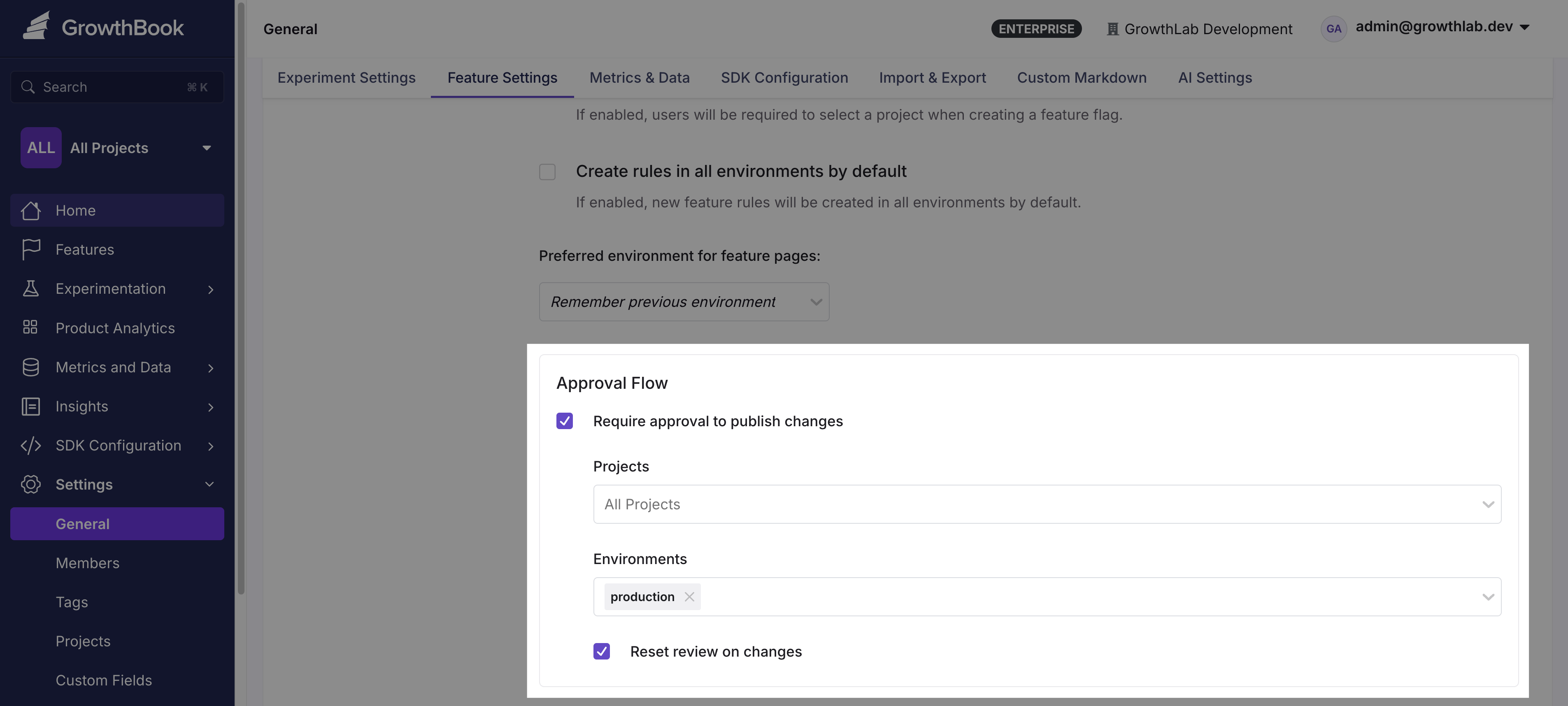
Enable Approval Flows for your organization under **Settings → General → Approval Flows**. Approval requirements apply per Project: the **All Projects** tab sets the default rule, and **+ Project override** adds a rule for specific Projects that replaces the default for them. Each Project's own settings page also shows its effective rule under an **Approvals** tab.

Each rule for Feature Flags, Configs, and Constants has the following options:

* **Specific environments** — Only changes affecting these environments require approval. Leave blank to require approval in all environments.
* **Required approver teams** — A draft cannot publish until someone from one of these teams approves it. Anyone eligible can still approve alongside them. Leave blank to accept an approval from anyone with Review access.
* **Reset review on changes** — If a draft is modified after being approved, the approval is revoked and a new review is required before publishing.
* **Block contributors from self-approving** — Prevents anyone who edited a draft from approving it. The draft's creator can never approve it, regardless of this setting.
* **Allow approve & publish in one step** — Adds an "Approve & Publish" option so reviewers with Publish access can approve and publish a draft together.
* **Require approval for** — Changes to rules, values, and prerequisites always require approval. Optionally also require approval for enabled environment changes (kill switches) and for metadata changes (description, owner, project, tags, etc.).

<img src="https://mintcdn.com/growthbook-ea15456d/giSZyh24PfnTkKz4/static/images/features/approval-flows/org-settings.png?fit=max&auto=format&n=giSZyh24PfnTkKz4&q=85&s=49f2a4658e6dbd03feed5eb36587283a" alt="Approval flow organization settings" width="3810" height="1716" data-path="static/images/features/approval-flows/org-settings.png" />

### Environment-scoped approvals

Approvals are environment-aware. An approval only counts for the environments the reviewer can review: if a reviewer's role (or team) limits their Review permission to specific environments, their approval covers only those environments, and a draft cannot publish until its approvals together cover every environment the draft changes.

To set up a separate approver group per environment — for example, one group that signs off on `production` changes and a different group for `staging`:

1. Create a team per environment ([Settings → Members → Teams](/account/user-permissions#teams)) and give each team a role with the **Review** permission limited to its environment.
2. Add the reviewers to their environment's team.
3. Optionally add both teams to **Required approver teams** on the approval rule. Because each team can only review its own environment, a `staging` draft can then only be satisfied by the staging team, and a `production` draft only by the production team.

Even without required approver teams, environment limits alone keep the groups distinct: a reviewer limited to `staging` can never sanction a `production` change.

### Requesting a Review

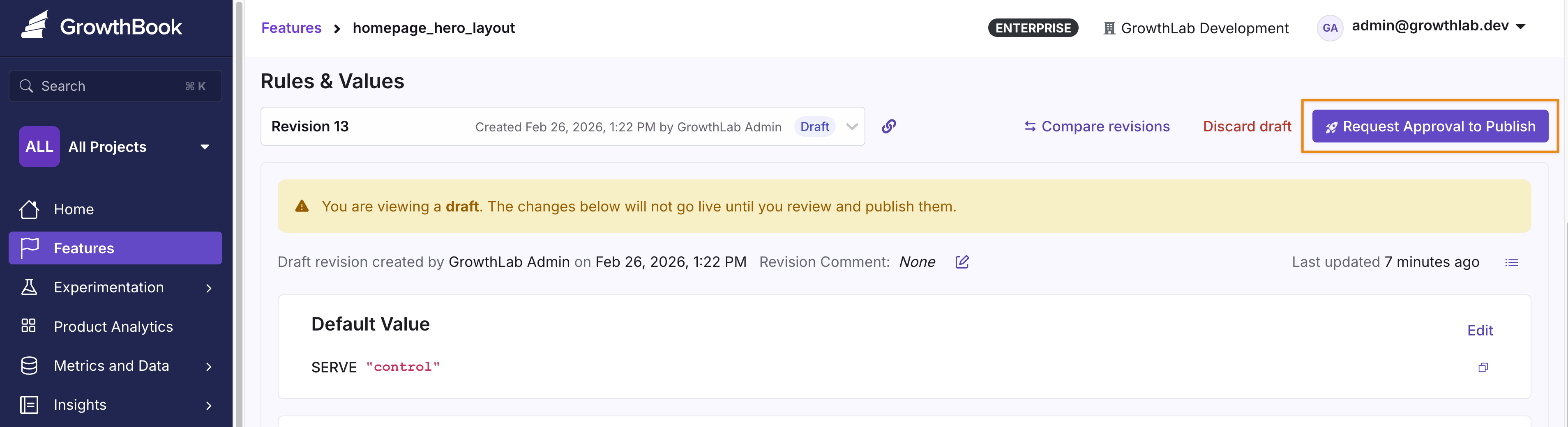
When Approval Flows are enabled, you must request a review before publishing changes. Add a detailed comment describing the changes so reviewers can understand the intent of your request.
<Frame>
  <img src="https://mintcdn.com/growthbook-ea15456d/giSZyh24PfnTkKz4/static/images/features/approval-flows/request-approval-to-publish.png?fit=max&auto=format&n=giSZyh24PfnTkKz4&q=85&s=41454d52df4c58d83bf49d558b7ffdc3" alt="Requesting a review for feature changes" width="800" data-path="static/images/features/approval-flows/request-approval-to-publish.png" />
</Frame>

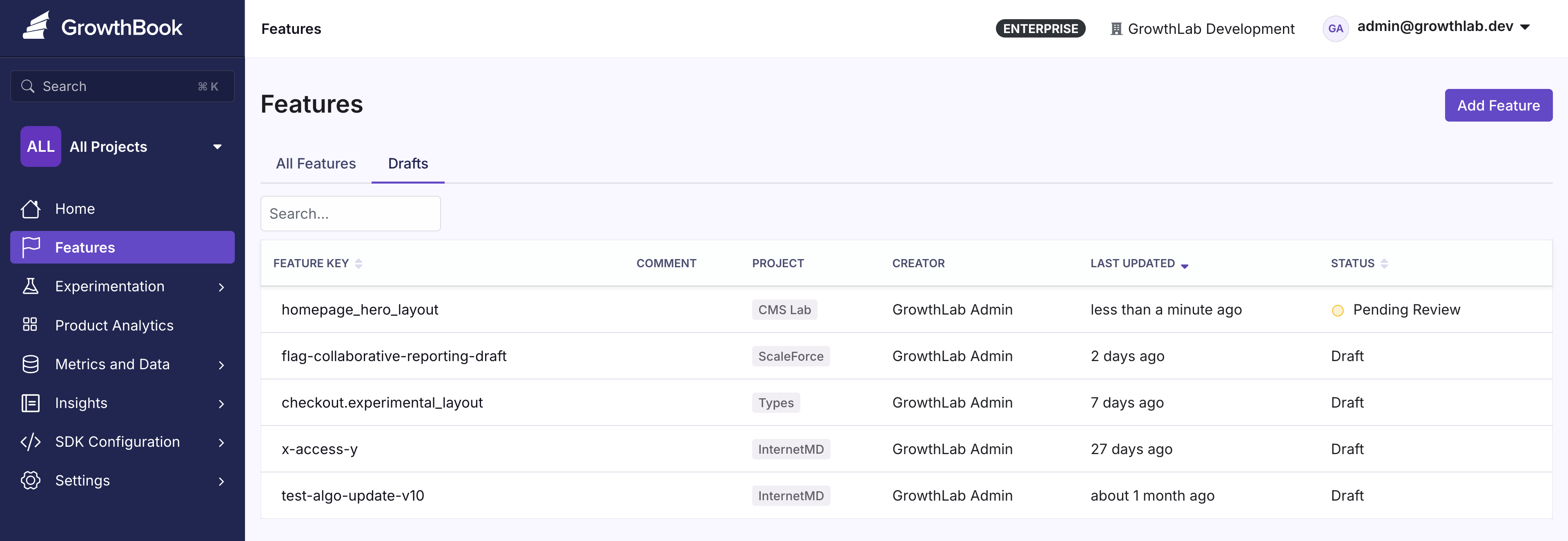
Requested reviews appear in the **Drafts** tab on the Features overview page with a **Pending Review** status. Sort by date updated to see your most recent request at the top.
<Frame>
  <img src="https://mintcdn.com/growthbook-ea15456d/giSZyh24PfnTkKz4/static/images/features/approval-flows/drafts-pending-review-list.png?fit=max&auto=format&n=giSZyh24PfnTkKz4&q=85&s=2374d98fadb3ec11eac1ccad986acefe" alt="Pending review list in the Drafts tab" width="800" data-path="static/images/features/approval-flows/drafts-pending-review-list.png" />
</Frame>

### Reviewing

A reviewer needs the **Review** permission for Feature Flags, covering the
environments the draft changes (see
[Environment-scoped approvals](#environment-scoped-approvals)). The person who
created the draft cannot approve it. If **Block contributors from
self-approving** is enabled, anyone who contributed to the draft is also
prevented from approving it. See [Permissions](/account/user-permissions) for
details.

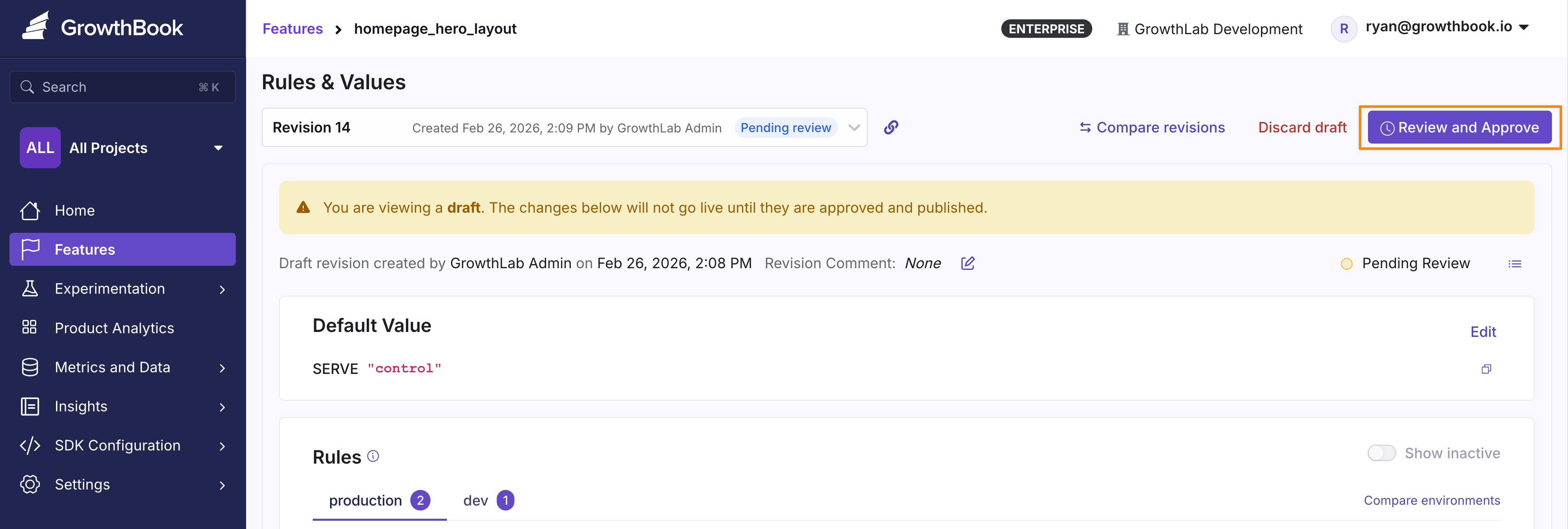
Click the feature, then click **Review and Approve** to open the review modal.
<Frame>
  <img src="https://mintcdn.com/growthbook-ea15456d/giSZyh24PfnTkKz4/static/images/features/approval-flows/review-and-approve-button.png?fit=max&auto=format&n=giSZyh24PfnTkKz4&q=85&s=a80a0323baa56b8d54fed256dfa84683" alt="Review and Approve button on a feature" width="800" data-path="static/images/features/approval-flows/review-and-approve-button.png" />
</Frame>

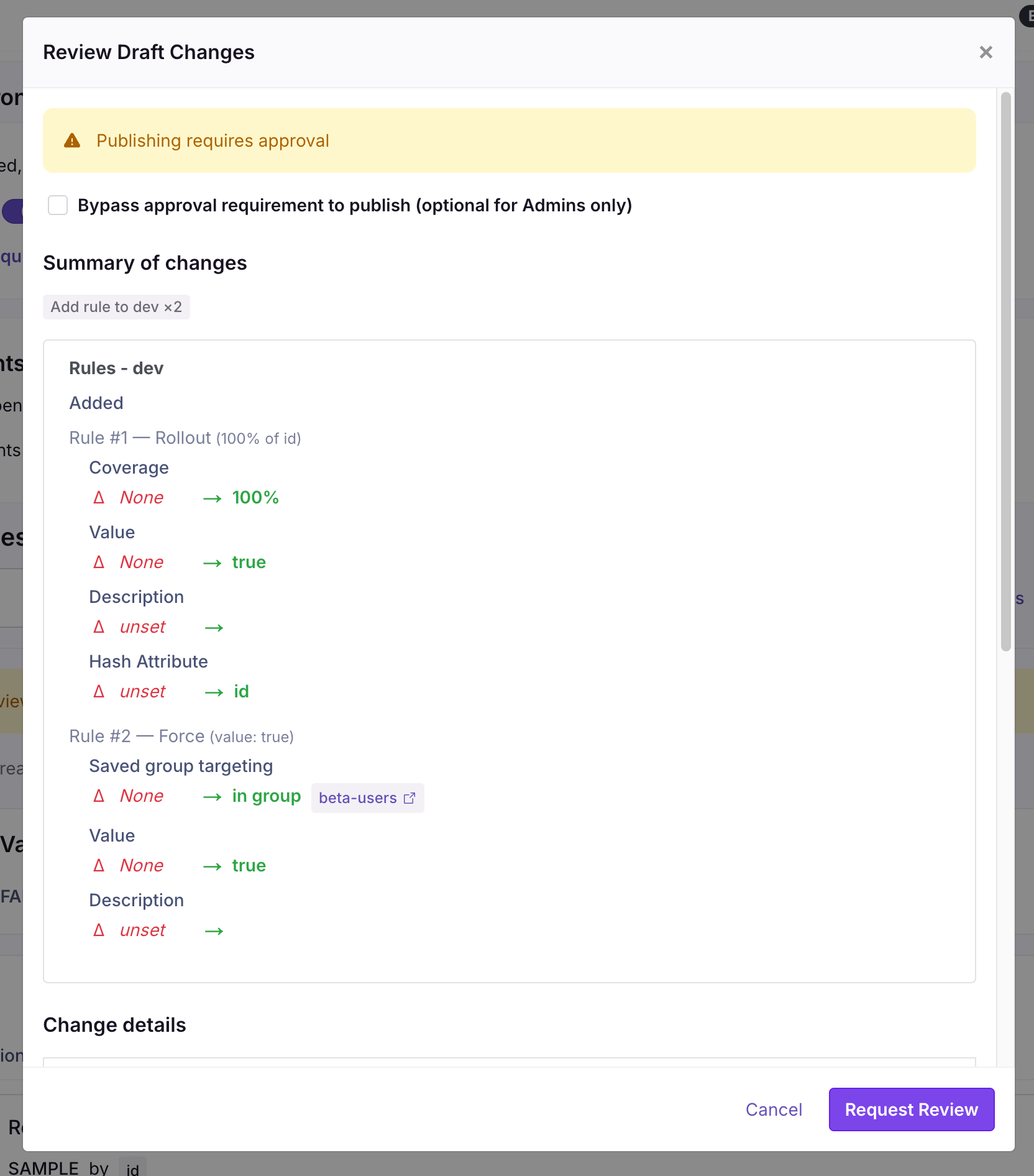
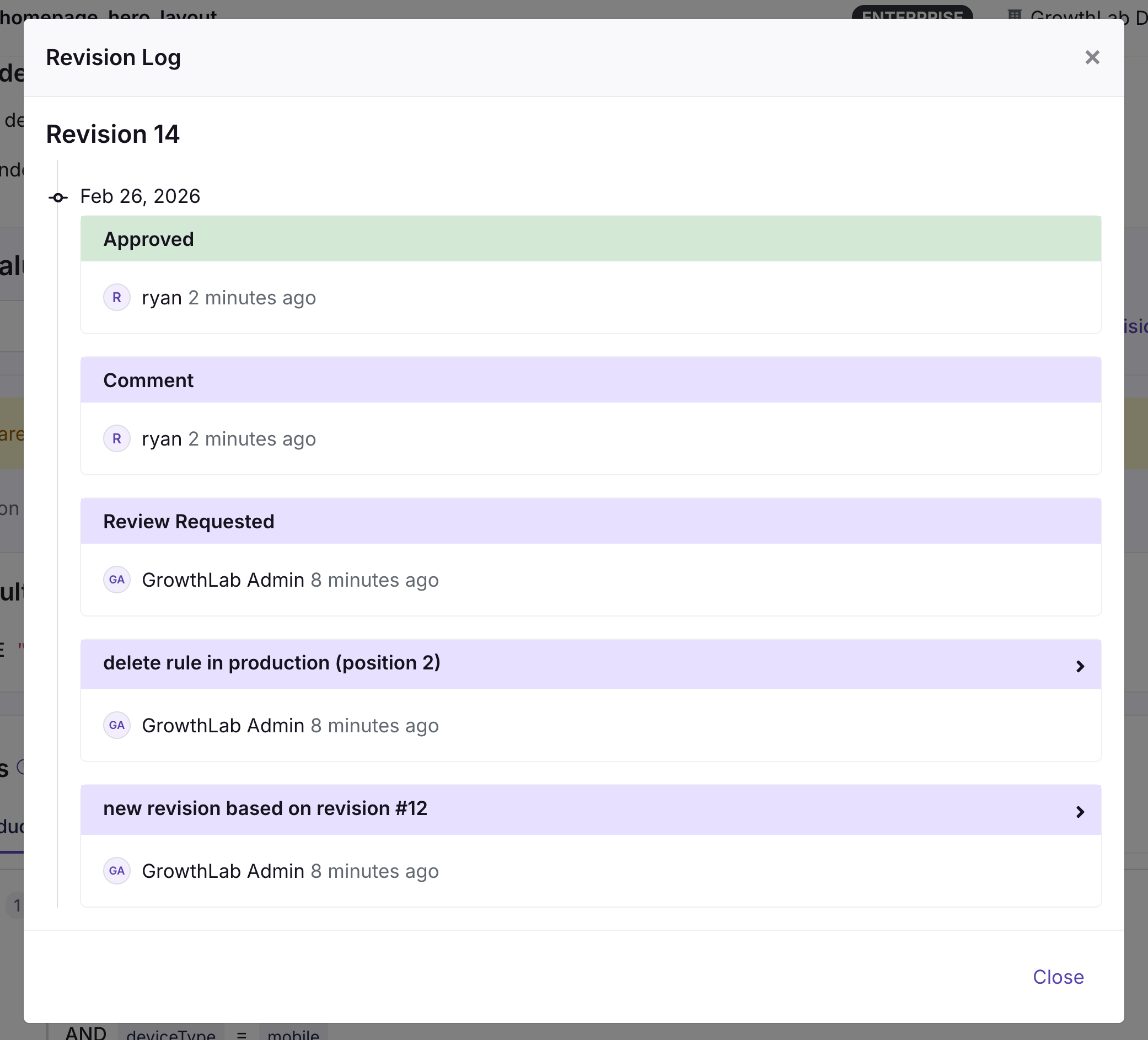
From here, you can see the diff between the currently published changes as well as the comments.
<Frame>
  <img src="https://mintcdn.com/growthbook-ea15456d/giSZyh24PfnTkKz4/static/images/features/approval-flows/review-draft-changes-diff-2.png?fit=max&auto=format&n=giSZyh24PfnTkKz4&q=85&s=6cc170ad8c0127f2466afc6a418151ae" alt="Diff view showing changes between published and draft versions" width="600" data-path="static/images/features/approval-flows/review-draft-changes-diff-2.png" />
</Frame>

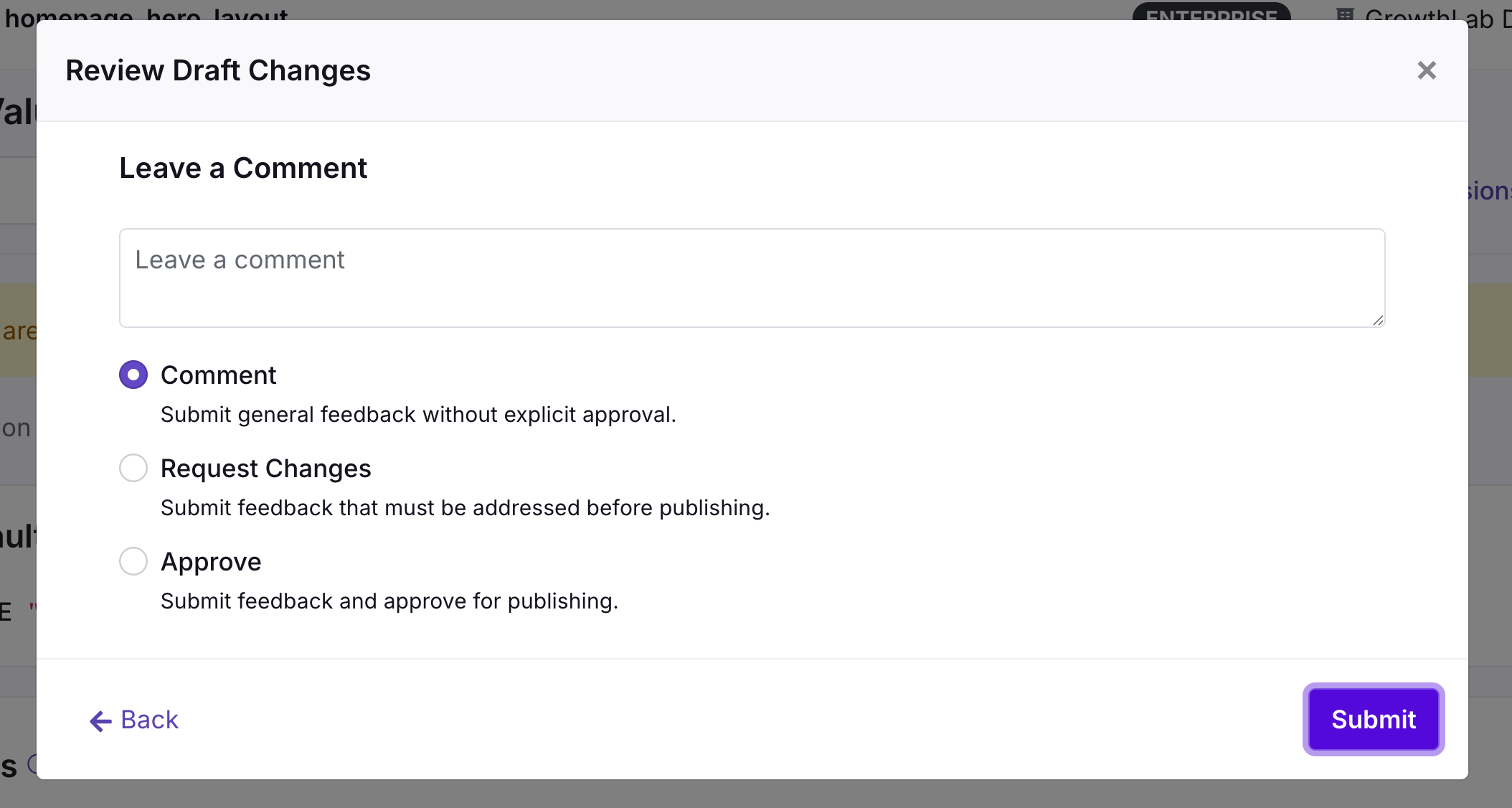
Click **Next** to write your review in the comment box and select a status:

* **Comment** — Add a note without formally reviewing the changes
* **Request Changes** — Flag issues that need to be addressed before approval
* **Approve** — Confirm that everything looks correct
<Frame>
  <img src="https://mintcdn.com/growthbook-ea15456d/giSZyh24PfnTkKz4/static/images/features/approval-flows/review-status-options.png?fit=max&auto=format&n=giSZyh24PfnTkKz4&q=85&s=c8e2be4aff60c83d89044ff7667755a2" alt="Review status options: Comment, Request Changes, Approve" width="600" data-path="static/images/features/approval-flows/review-status-options.png" />
</Frame>

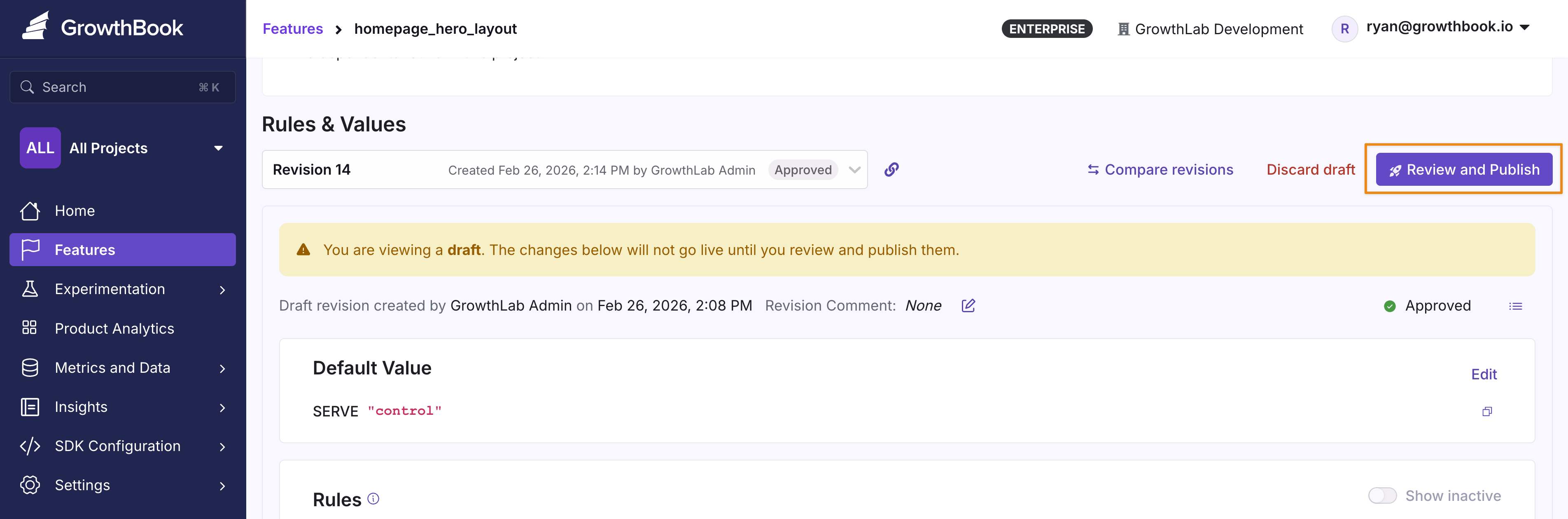
Once the changes are **Approved**, they can be published.
<Frame>
  <img src="https://mintcdn.com/growthbook-ea15456d/giSZyh24PfnTkKz4/static/images/features/approval-flows/approved-ready-to-publish.png?fit=max&auto=format&n=giSZyh24PfnTkKz4&q=85&s=fcc0e373f11f92aaffc817e37ba378b0" alt="Approved draft ready to publish" width="800" data-path="static/images/features/approval-flows/approved-ready-to-publish.png" />
</Frame>

### Publishing with Approvals

After approval, anyone with **Publish** access to the affected environments can
publish the draft. If the approval rule lists **Required approver teams**, the
draft additionally cannot publish until a member of one of those teams has
approved it. A user with **Bypass draft approvals** can publish without an
approval.
<Frame>
  <img src="https://mintcdn.com/growthbook-ea15456d/giSZyh24PfnTkKz4/static/images/features/approval-flows/publish-with-admin-bypass.png?fit=max&auto=format&n=giSZyh24PfnTkKz4&q=85&s=455049fd96293c4fd7fa12ed2e910ce9" alt="Publishing approved changes with admin bypass option" width="600" data-path="static/images/features/approval-flows/publish-with-admin-bypass.png" />
</Frame>

Once published, a green "Live" badge confirms the version is published and active.

<img src="https://mintcdn.com/growthbook-ea15456d/giSZyh24PfnTkKz4/static/images/features/approval-flows/revision-live-badge.png?fit=max&auto=format&n=giSZyh24PfnTkKz4&q=85&s=3e1d80d1c0a1cb9f15fb97c8569fe98d" alt="Green badge indicating the published version is live" width="3212" height="406" data-path="static/images/features/approval-flows/revision-live-badge.png" />

### Visualize Changes with Compare Revisions

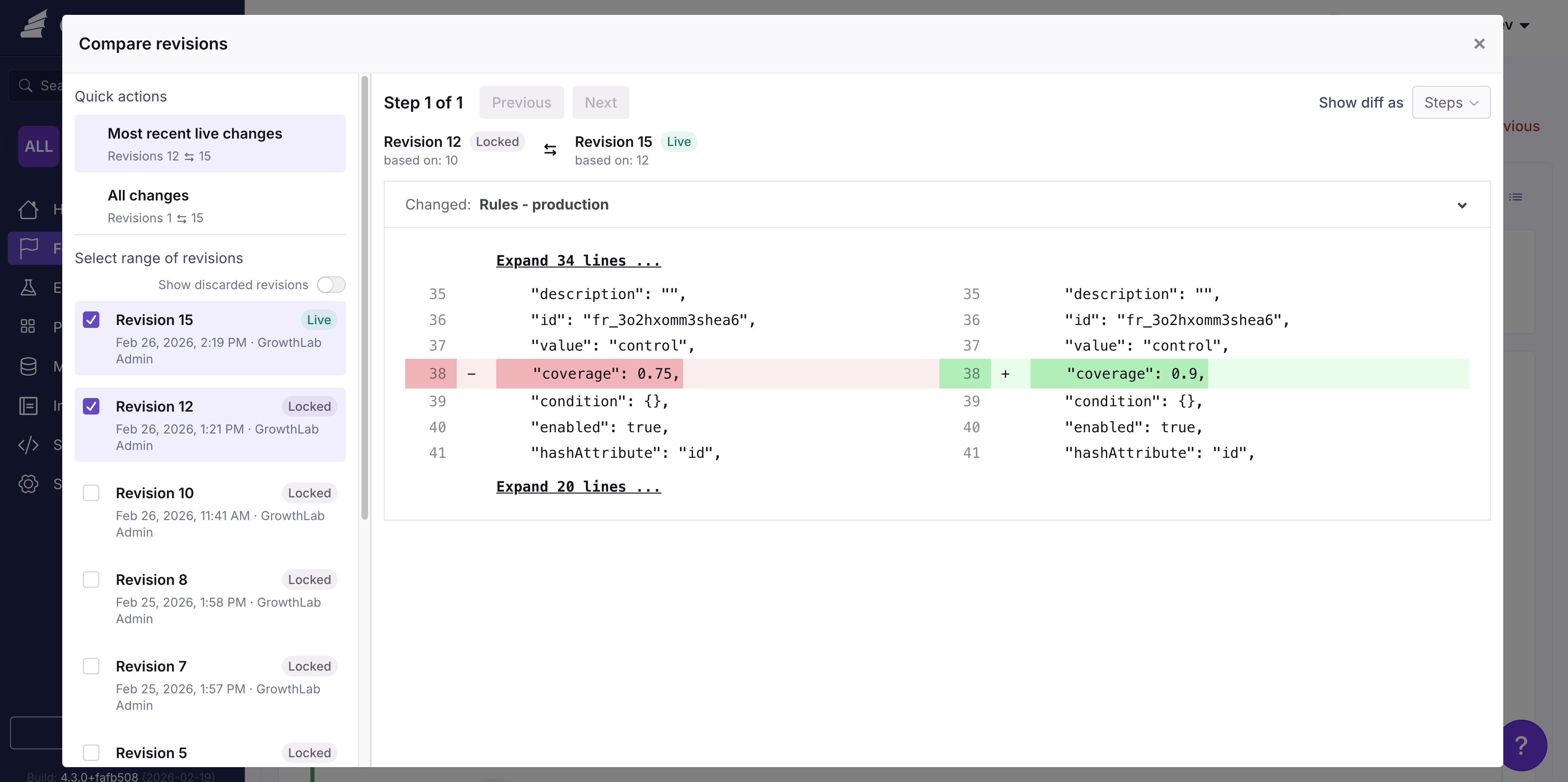
Get a detailed diff of the changes between published and draft versions by clicking the **Compare Revisions** button.
<img src="https://mintcdn.com/growthbook-ea15456d/giSZyh24PfnTkKz4/static/images/features/approval-flows/compare-revisions-diff.png?fit=max&auto=format&n=giSZyh24PfnTkKz4&q=85&s=cc7926030d41e68f3310f75e519e6602" alt="Compare Revisions button" width="3804" height="1896" data-path="static/images/features/approval-flows/compare-revisions-diff.png" />

## Saved Groups

Saved groups follow the same draft → review → publish lifecycle as feature flags. Every change you make to a saved group — editing values or conditions, updating metadata, or archiving it — is tracked as a revision so you can review, compare, and roll back changes over time.

### Saved Group Revisions

When you edit a saved group, GrowthBook creates a draft revision. Drafts are visible to everyone with access to the saved group, but they don't affect SDK evaluations until they're published — so you can stage and review your changes before they reach your users.

From the saved group detail page you can:

* **Switch revisions** — Use the revision dropdown to view the live revision or any open draft. The dropdown shows the author, last update date, and review status for each revision.
* **Create a new draft** — Click **New Draft** from the live revision to start a new set of changes.
* **Compare revisions** — Click **Compare revisions** to see a side-by-side diff of any two revisions.
* **Revert to a previous revision** — Open an older merged revision and click **Revert to Previous** to apply its state as a new draft.
* **Discard a draft** — Authors can discard their own draft if they no longer want to publish it.
* **Fix merge conflicts** — If another user publishes changes while your draft is open, click **Fix conflicts** to resolve them before publishing. The conflict resolution flow works the same way it does for features.

### Saved Group Approval Flows

<CommercialFeature feature="require-approvals" />

You can require approvals for saved group changes independently from feature flag approvals.

#### Settings

Enable saved group approvals from **Settings → General → Approval Flows**. The Saved Groups section has its own toggle, separate from the Features section:

* **Require approval to modify Saved Groups** — When enabled, every change to a saved group must be reviewed and approved by someone else before it goes live.
* **Required approver teams** — A draft cannot publish until someone from one of these teams approves it. Leave blank to accept an approval from anyone with Review access.
* **Require approval for** — Approval is always required for changes to values and conditions. Use the **Metadata changes** checkbox to also require approval for edits to the description, owner, project, or tags.
* **Reset review on changes** — If a draft is modified after it has been approved, the approval is revoked and a new review is required before publishing.
* **Block contributors from self-approving** — Anyone who edited the draft is blocked from approving it, ensuring a separate reviewer must approve before publishing.
* **Allow approve & publish in one step** — Adds an "Approve & Publish" option so reviewers with Publish access can approve and publish a draft together.

#### Requesting and Reviewing

When approvals are enabled, **Review & Publish** becomes **Request Approval to
Publish**. The request appears in the Saved Group's revision list with a
**Pending Review** status. A user with **Review** access can open the request,
inspect the diff, comment, request changes, or approve it. The draft's creator
cannot approve it. When **Block contributors from self-approving** is enabled,
other contributors cannot approve it either.

After approval, a user with **Publish** access in every Project assigned to the
Saved Group can publish it. **Bypass draft approvals** allows the same user to
publish without an approval.

#### Archiving and Unarchiving

Archiving and unarchiving a Saved Group always creates a revision. When approval
flows are enabled, that revision must be approved before it takes effect.
Archiving requires **Archive & delete** access; unarchiving requires **Publish**
access. A Saved Group with active references from Feature Flags, experiments, or
other Saved Groups cannot be archived until those references are removed.