

Interleaving is in private beta for Enterprise customers. The feature, its SDK API, and its analysis will evolve with customer feedback. Contact your GrowthBook account team to get access.
Why interleaving
Search and recommendation teams regularly iterate on their rankers with new models, new data, and new parameters and weights. A mature ranker is already good, so most changes have small effects, and small effects need a lot of users. Testing rankers one A/B test at a time becomes the bottleneck. Offline evaluation is fast, but it is a poor predictor of which ranker wins with real users. Interleaving sits between offline evaluation and A/B testing. Instead of showing ranker A to one group of users and ranker B to another, it merges both rankers’ lists into one every time a list is shown, so every user sees items from both rankers. Every user compares both rankers, so each user is their own control. Companies that run interleaving report needing a small fraction of the traffic a standard experiment needs:
In marketplaces, interleaving also avoids a bias that A/B tests on rankers suffer from: users who see ranker B can book supply that users on ranker A would otherwise have booked. With interleaving both rankers face the same supply on every search. Other solutions to marketplace interference, such as synthetic controls or cluster randomization, require hard-to-justify assumptions and/or data-hungry approaches.
For a longer introduction, read our blog post Interleaving experiments: test new rankers with a fraction of the traffic.
How it fits into your experimentation program
Interleaving answers a narrower question than an A/B test: which ranker’s items do users pick more often? It does not tell you how much a business metric would change if you shipped the winner, because no user ever sees either ranker on its own. Most teams use it as a screen:- Offline evaluation to discard the clearly bad candidates.
- Interleaving to compare the remaining candidates with real users, on a small share of traffic.
- An A/B test (or a switchback or synthetic control test where interference is a risk) on the one or two finalists to measure the effect size before shipping or as periodic validation.
How it works
Team draft
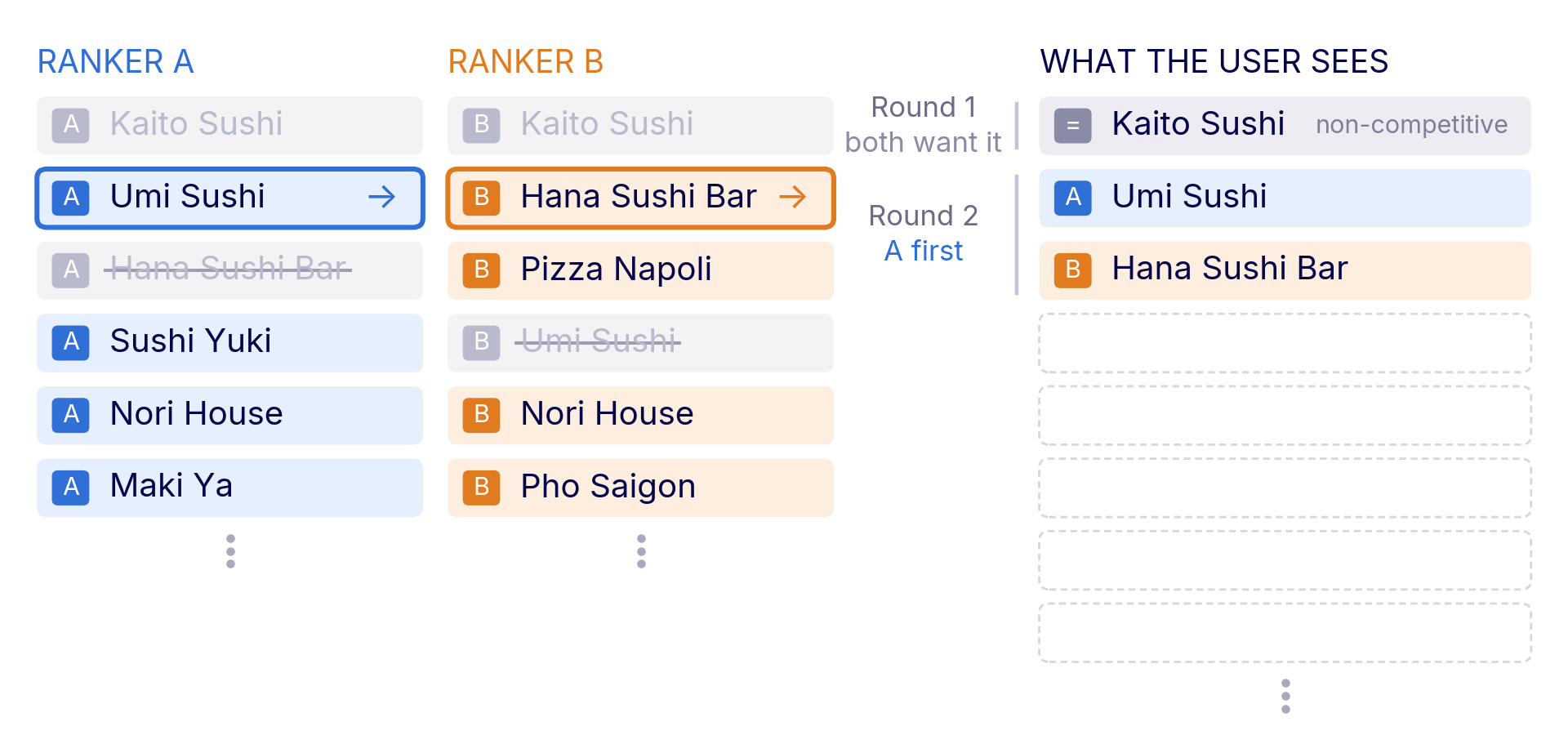
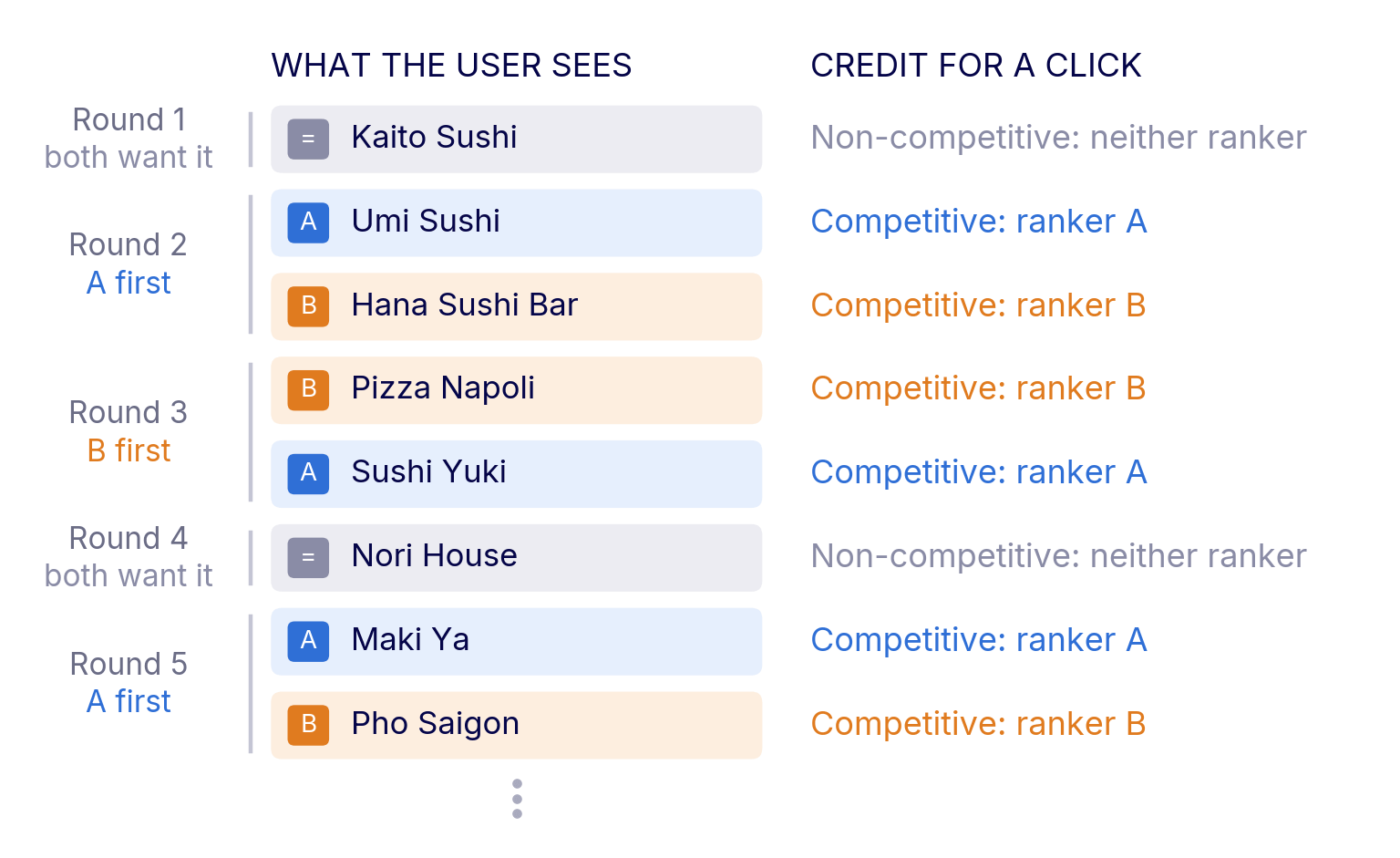
GrowthBook merges the two lists with team-draft interleaving, the method Netflix, Airbnb, and DoorDash use. It works like two team captains picking players. In every round, a coin flip decides which ranker picks first, and each ranker takes the highest item on its list that is not in the merged list yet. The user sees one list and has no way to tell that two rankers are at play. There is one special case. If both rankers want the same item in the same round, it goes in once and belongs to neither ranker. An item both rankers agree on cannot tell you which ranker is better, so engagement with it counts for neither. GrowthBook calls items that belong to a ranker competitive and the rest non-competitive. Items that fill out the list after one ranker runs out are non-competitive too. Team drafting has two attractive properties: (1) every competitive round gives each ranker exactly one item, so both get the same number of competitive items; (2) a coin flip decides who picks first, so neither ranker gets the higher position of a pair more often than the other.Example
Take a food delivery app with a “Recommended for you” list. Ranker A is in production and weights the cuisine the user orders most. Ranker B mixes in other cuisines. Let’s walk through 2 rounds of team drafting.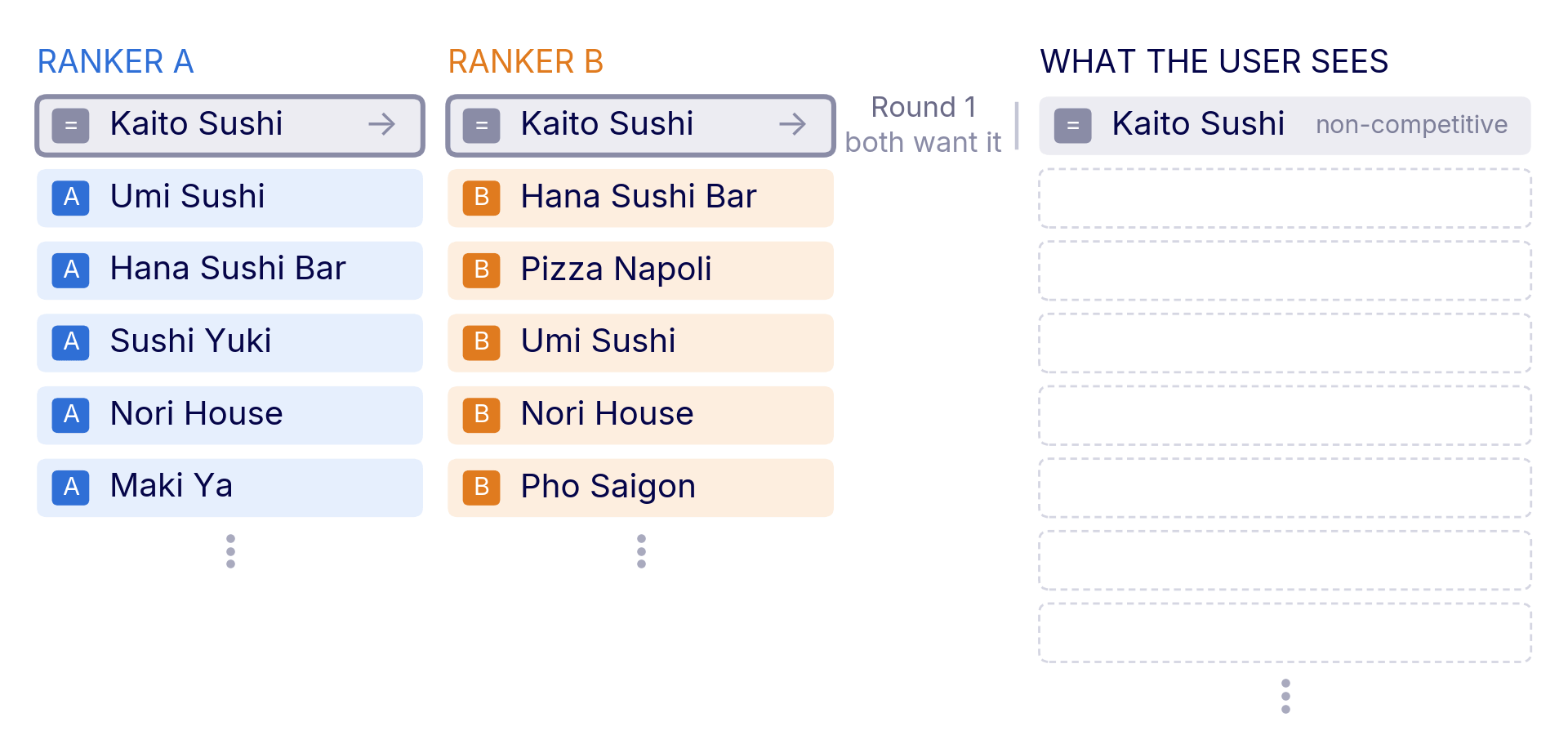
Two ways to pick a winner
The draft decides what the user sees and whether an item in the list is competitive (i.e. helps us differentiate between rankers). There are two different ways, then, to attribute positive outcomes with one ranker vs the other:- Paired analysis compares the two rankers within each merged list and requires the search/query ID (the
ranking_id) to be tracked with the exposure and with all downstream engagements within the list. An engagement with a competitive item credits the ranker that drafted the item, and the test asks whether one ranker earns more engagements on competitive items than the other. It is the most sensitive option and fits in-context signals such as clicks, add-to-cart, or orders placed straight from the list. - Preference analysis gives each user one vote for the ranker whose items they engaged with more across the whole experiment. It fits outcomes that build up over several visits, such as a booking after a week of searching, and it keeps a few very active users from deciding the result. We cover how preference is counted across multiple queries/rankings in Understanding interleaving results.
Next steps
- Getting set up: supported SDKs, the
interleave()call, exposure tracking, metric requirements, and configuring the experiment in GrowthBook. - Understanding interleaving results: how to read the results table, the statistics behind each analysis, and how interleaving relates to A/B test results.
- REST API: create, start, stop, and refresh interleaving experiments programmatically.