

- A shared endpoint or hostname used across many flags (e.g. an API server URL).
- A block of JSON config reused by several flags.
- Values that differ per environment (e.g. a production vs. staging URL) behind a single reference.
Constant types
Each constant has one type:- String — a plain string value (URLs, keys, identifiers, etc.).
- JSON — a JSON object (key/value map), used as a reusable config template merged via
$extends.
Per-environment values
A constant has a base value plus optional per-environment overrides: when a flag is built for an environment, its override is used if set, otherwise the base value. A reference to a constant with no value for the target environment is left as-is in the payload.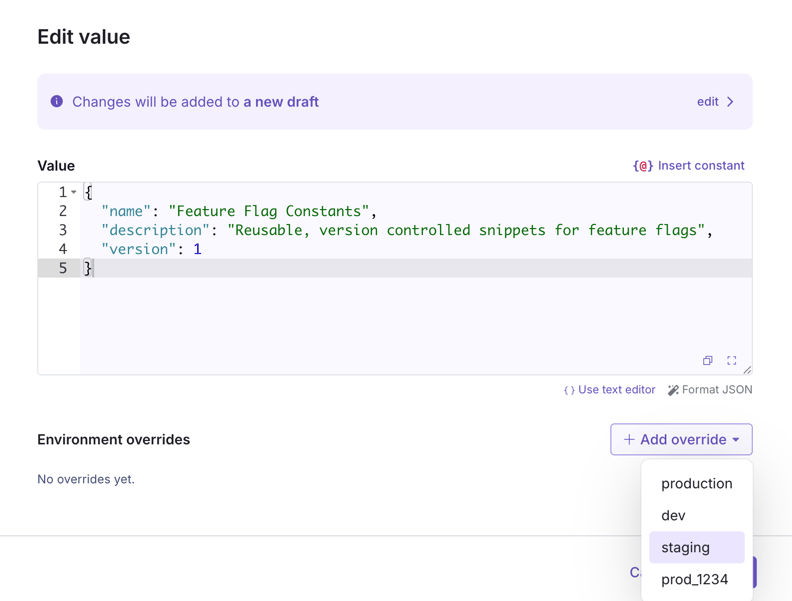
Referencing constants
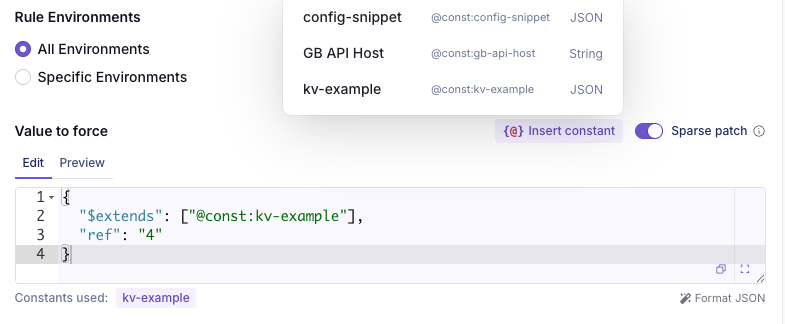
Constants are referenced by their key — a slug auto-generated from the name (e.g. a constant named “API Server” gets the keyapi-server). In a feature value editor, use Insert constant to pick one, or type the reference by hand. The reference syntax depends on the constant’s type:
String constants — {{ @const:key }}
Interpolate a string constant anywhere inside a feature’s or a config’s string value (including inside a string field of a JSON value):
JSON constants — $extends
JSON constants are objects (key/value templates). Compose them with an $extends array that lists one or more constant references. Each referenced object is merged in, in order, and the object’s own keys override the merged result:
$extends works for a nested value too:
$extendsreferences, in array order (later references override earlier)- the object’s own keys
$extends in the object doesn’t matter — own keys always win — but the order of references within the array does.
Own keys replace wholesale. A constant is an atomic building block: whatever an own key states is exactly what it resolves to. When an own key and the merged base are both objects, the own value replaces the inherited one outright — it is not merged into it. For example, extending a base of { "retry": { "connect": 1000, "read": 5000 } } with own keys { "retry": { "read": 8000 } } resolves to { "retry": { "read": 8000 } } — connect is dropped, not inherited. Restate any inherited fields you want to keep. (Writing null sets the value to null; it does not delete the key.)
Constants replace; configs and feature values patchThis is deliberately the opposite of how configs and feature values compose. A child config — or a config-backed feature value — is a deep, targeted patch: it merges recursively, key by key, restating only the leaves it changes. A constant’s own keys are authoritative wholesale. The same
$extends syntax written directly in a feature or config value follows the deep-patch rule, not this one — the mode depends on which entity’s keys they are, not on what is being extended.$extends reference (or a nested object that itself uses $extends) drops in as a complete unit. A constant’s value can itself reference other constants; they’re resolved recursively.
Advanced: control merge order with inline objectsAn Here
$extends entry can also be an inline object instead of a @const: reference. It merges at that position, so a later reference can override it — something own keys can’t do (they always win). Most templates only need references plus own keys; reach for this only when you need a literal layer beneath a referenced one.@const:override-pack can override the inline timeout. Loose entries that are neither a reference nor an object (numbers, booleans, bare strings) are rejected when you save.How resolution works
References are resolved when the SDK payload is built, on the server. SDKs receive the fully-resolved value, so no SDK changes or upgrades are required. A few rules:- On by default. Feature and config values are scanned for references automatically.
- Escape literals. To keep a literal
{{ @const:... }}or@const:key in a value, wrap it in backticks. - Graceful failure. An unresolvable
{{ @const:... }}interpolation — unknown constant, type mismatch, or a cycle — is left in place as literal text rather than failing the build. An unresolvable$extendsreference is dropped instead (a leftover directive would be invalid config). - Archived references are stripped. Archiving a referenced constant is blocked (see Editing and approvals), but any reference that still points at an archived constant is removed from the value (string interpolations dropped, JSON references removed) rather than resolved.
Protecting keys used by running experiments
If a constant feeds a config whose running-experiment guard is enabled, publishing a change to the constant is subject to that same guard: it is blocked when the change would alter a config key currently used by a running experiment or contextual bandit. The guard is computed live, so it clears on its own once the experiment stops. To publish anyway, acknowledge the block — confirm the warning in the app, or pass"ignoreWarnings": true in the body of the REST publish request. See Protecting keys used by running experiments for the config-side details.
Editing and approvals
Constant changes go through the same draft → review → publish flow as features, governed by your organization’s require-reviews settings matched on the constant’s project. You can view past versions, compare revisions, and revert from the constant’s page. Archiving is blocked while a constant is still referenced — the archive dialog lists every feature and constant that uses it, so you can remove those references first.REST API
Constants are fully manageable over the REST API — create, update, archive, list references, and drive the revision/approval flow programmatically.Permissions
Creating, editing, and deleting constants requires the Manage Constants permission (theConstantsFullAccess policy), which is included in the Engineer, Experimenter, and Admin roles by default. Constants can be scoped to specific projects.