

Create an SDK Connection
In the GrowthBook App:- Go to SDK Configuration → SDK Connections.
- Click Add SDK Connection.
- Give it a name (e.g.,
Production Web), pick the environment, and choose the SDK language. - Enable the
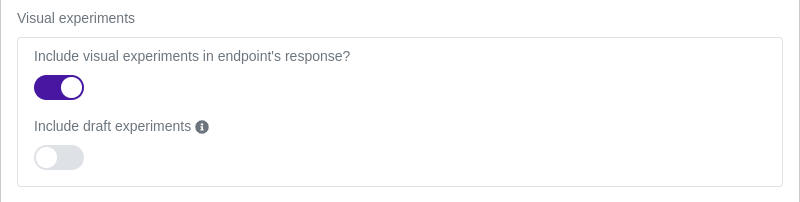
Include Visual Experimentstoggle. This is the single most important step — without it, the SDK payload won’t include your visual experiments and they will not render. - Optionally enable Include Drafts if you want preview links to work for draft experiments. We recommend leaving this off in production.
Choosing an SDK
GrowthBook has four SDKs that can render visual experiments. Pick based on how your site is built and how much you care about flicker:
Our strong recommendation: if you have access to a CDN edge runtime, use the Edge SDK. It eliminates flicker entirely and produces a far better experience for users. The Edge SDK is the only option that delivers visual variations as part of the initial HTML response — every other option has to apply changes in JavaScript after the page has begun rendering.
If an Edge SDK isn’t practical, the Script Tag SDK in
<head> is the next best thing.
Avoiding flicker
Flicker (or FOOC — flash of original content) happens when the browser paints the control of a page before the SDK has a chance to apply the variation. The user sees the original page briefly, then the variation snaps in. It looks bad, it can skew engagement metrics, and on slow connections it can be jarring. There are three established strategies. Use as many as apply to your stack:Strategy 1: Use an Edge SDK (recommended)
The cleanest fix is to apply variations at the edge, before the HTML ever reaches the browser. With an Edge SDK, the user receives HTML that’s already been mutated to their assigned variation. There’s nothing to flicker — the control is never rendered. This is genuinely a category better than the other options. Every client-side approach has some irreducible delay between the browser starting to render and the SDK applying mutations. Edge rendering eliminates that delay entirely, and as a bonus your variations are visible to SEO crawlers that don’t execute JavaScript. If you can use the Edge SDK, use it.Strategy 2: Load GrowthBook in <head>, as early as possible
If you can’t use an Edge SDK, the next best thing is to make sure GrowthBook is one of the very first things the browser fetches. Put the SDK <script> tag at the top of <head> — above other scripts, above analytics, above heavy third-party tags.
- Putting GrowthBook at the bottom of
<body>— the page is already painting by the time the script runs. - Loading GrowthBook through a tag manager (GTM, Tealium) — adds an extra round-trip and a noticeable delay.
- Heavy synchronous scripts ahead of GrowthBook in
<head>— they block the SDK from running.
Strategy 3: Anti-flicker script
If you can’t use an Edge SDK and head-loading still isn’t fast enough (typical on slow mobile networks or pages with lots of synchronous third-party scripts), add an anti-flicker script. An anti-flicker script blanks the page (usually by settingbody { opacity: 0 } or display: none) until the SDK has applied variations, then reveals the page. The user sees a brief blank screen instead of the control followed by the variation.
This is the same approach every client-side A/B testing tool uses. It’s a tradeoff: you trade flicker (which looks bad) for a brief blank flash (which makes the page feel slower to appear).
GrowthBook’s works hard to keep the library size as small as possible and our performance as high as possible. As a result, our experiments load faster than our competition, with or without the anti-flicker scripts. The anti-flicker is enabled through SDK config — see the Script Tag SDK docs for the exact snippet.
- Set a max-wait timeout. If the SDK fails to load (network error, API outage), you don’t want to leave the page blank forever. A typical timeout is 1–4 seconds.
Strategy 4: Consider whether visual testing is the right tool
Heavily client-side-rendered apps (complex React/Vue/Svelte that re-render the DOM after hydration) are especially prone to flicker, because the AI Visual Editor’s DOM mutations can be overwritten by the framework’s re-render. For those, Feature Flags implemented in code are usually a better fit than visual experiments — the variation is rendered by your application itself, so there’s no race condition.Content Security Policy (CSP)
If your site uses a Content Security Policy, you may need a few additions.script-src
Required only if you use the Custom JavaScript injection feature of the Manual mode editor. Pure-style and copy changes don’t need it.
If you need it, allow 'unsafe-inline' and 'unsafe-eval':
Using script nonces
As an alternative to'unsafe-inline', GrowthBook supports nonces. This requires custom edge configuration.
First, generate a unique nonce on every request and add it to your CSP header (e.g., in a Cloudflare Worker).
Then, pass the nonce to the SDK as jsInjectionNonce. With the Script Tag SDK, set it before loading the GrowthBook snippet:
'unsafe-eval'.
A note on temporary rollouts
When an experiment finishes and you enable a Temporary Rollout to ship the winning variation, the variation continues to be delivered through the same SDK Connection. The same flicker considerations apply. Temporary Rollouts are explicitly named temporary because long-term you should re-implement the winning variation in your site’s code.Next steps
- Preview and QA — preview links, debug panel, live-experiment warning.
- Troubleshooting — fixes for common issues, including SDK and flicker problems.
- Script Tag SDK — the recommended quick-start SDK.
- Edge SDK — recommended for zero-flicker rendering.